

STARGO WORK, explained: one system from acquisition to operations
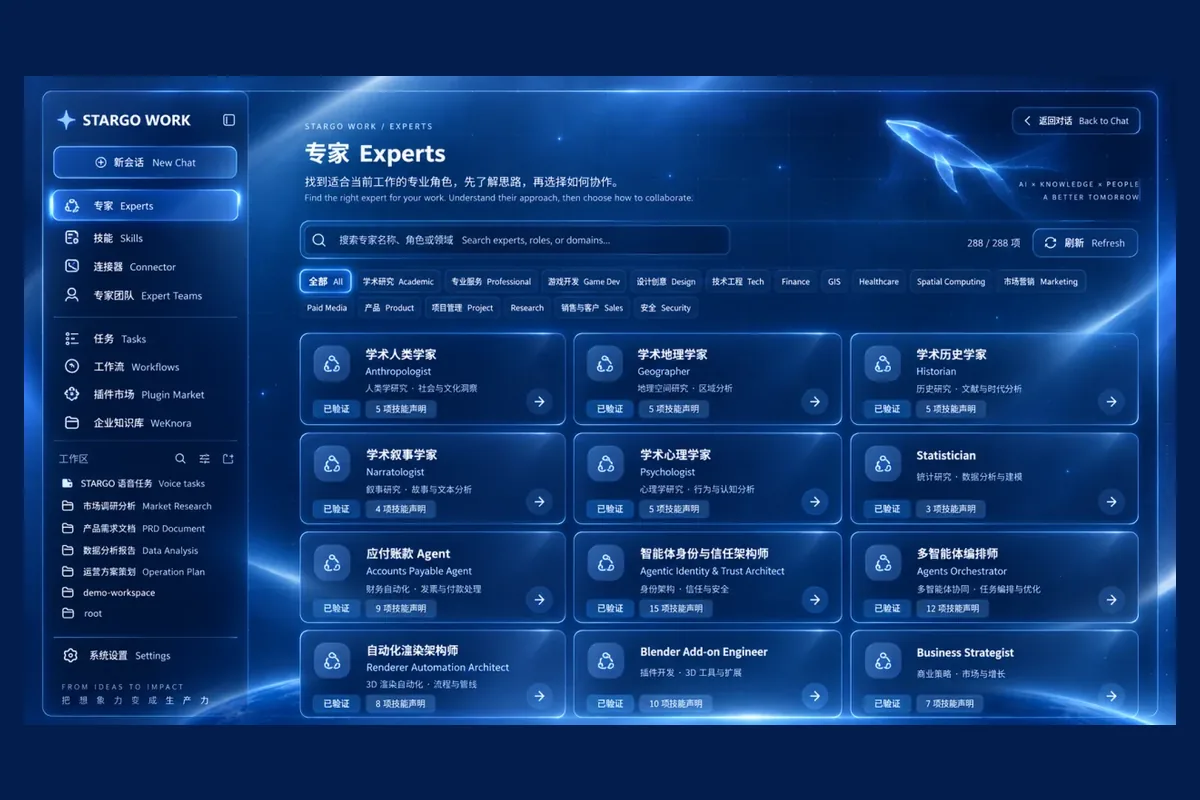
STARGO WORK is a browser-based desktop AI operating system for manufacturing and global trade enterprises. Growth OS for proactive acquisition and Sales Desk for trade sales lead the business, while operations, creative work, enterprise knowledge and 288 specialized AI roles support them in one workspace — and people keep the decisions.
This guide covers sixteen topics in business order: what each one does, what it is worth to an owner and what it depends on.
How does one system connect acquisition to operations?
Growth OS and Sales Desk lead the journey: find customers and qualify opportunities, then carry conversations, quotes, PIs and order handoffs along one sales chain. Operations, creative work, AI employees, enterprise knowledge and management tools support that line, and every outcome feeds the next growth cycle.
- 01Proactive acquisitionGrowth OSFind and qualify
- 02Trade salesSales DeskEngage and quote
- 03FulfillmentERP and deliverySource and deliver
- 04Business coordinationFinance and serviceCollect and support
- 05Repeat growthRetention and growthRetain and improve
Customer context and outcomes feed the next growth cycle.
Value for the owner: less copying and fewer handoffs; more evidence-backed progress and results you can check.
Availability: core workflows keep evolving; capabilities open by configuration and agreed scope. See the full catalogue.
Growth OS: how are opportunities found proactively?
Growth OS goes beyond incoming inquiries. Around your products, markets and customer profile, it finds dealers, importers and target accounts through public search, company websites, maps, social channels, trade shows and authorized trade data; ranks them by buying signals, reorder patterns and contact research; and prepares multilingual outreach and follow-up plans. Thin evidence is flagged, never filled in.
Value for the owner: scattered prospecting becomes targeted, evidence-backed and prioritized.
Availability: core workflows are being built out; live data and outreach are connected by authorization. See Customer acquisition.
Sales Desk: how does a customer become an order?
Sales Desk takes over approved prospects and inquiries from every channel. Email, website, WhatsApp and Alibaba.com messages arrive in one place, requirements are read from messages and attachments, and records, conversations, quotes and orders form a complete customer view. Replies rest on specifications, pricing policy, MOQ and trade terms; follow-ups, reminders and human takeover prevent duplicate outreach.
Growth OS · proactive acquisition
Sources (authorized access only)
- Public search
- Company websites
- Map listings
- Social channels
- Trade shows
- Authorized trade data
Ideal customer profile: product × market × buyer type
- 01Discover the right accountsDealers, importers, wholesalers and target accounts
- 02Research people and companiesCompany research, decision makers and contact details
- 03Spot opportunities backed by evidenceBuying signals, reorder patterns, supplier changes and value
- 04Prepare the outreach planMultilingual playbooks, follow-ups, trade-show leads and reactivation
Approved prospect → Sales Desk
Source, research, product interests and next actions travel with it — no re-entry.
Sales-ready outputs
- Prospect list
- Contact details
- Opportunity brief
- Outreach plan
Sales Desk · trade sales
Intake
- Alibaba.com
- Website inquiries
- Growth OS prospects
A complete customer view · CRM
- Company / people
- Requirements / products
- Opportunity / owner
- Messages / quotes
- 01UnderstandExtract requirements; organize attachments and drawings
- 02RespondMatch products, translate and draft from company facts, then review
- 03Follow throughTasks, reminders and stages, with human takeover and history
What follows
- Quote
- PI
- Order
- Support
- Reorder
Live data and outreach require authorization; live channel messaging and business handoffs are connected and validated one by one.
Value for the owner: anyone can pick up an account with full context, from conversation to quote, order and reorder.
Availability: the workspace exists; live channels and handoffs are connected and validated one by one. See Inquiries and conversations.
How are quotes, PIs and trade documents controlled?
Quotes are drafted from configuration, quantity, currency and trade terms, using price lists, quote history, discount permissions and margin guardrails; AI never invents prices. Authorized people approve prices and commitments, and an agreed quote becomes a PI with its approved version kept. Contract clause checks run on the same chain, together with the preparation and filing of commercial invoices, packing lists, certificates of origin and Form E materials, and bills of lading.
Value for the owner: grounded prices, protected margins, versioned documents — and approval kept separate from sending.
Availability: live prices, contracts, signatures and documents depend on connected systems; official issuance stays with the authorized bodies. See Quotations and PI.
ERP and commerce: can the back office keep up?
Sales and the back office share one desktop. Product records and bills of materials stay consistent, order demand links to purchasing and incoming goods, stock shows what can be delivered, production, quality and lead times connect to sales promises, and orders match invoices. Catalogs, storefront administration and dealer portals connect as required.
Value for the owner: know whether you can deliver, when, and that the records agree afterwards.
Availability: ERP and commerce foundations exist; cross-system work and AI actions are configured and accepted per company. See ERP and fulfillment.
After the sale, who follows delivery, payment and reorders?
A sale is a milestone, not the end. Deposits, production, quality checks, shipment and customer confirmation are organized by task, owner and deadline, with delays and missing records flagged. Logistics, receivables, reconciliation and export-rebate materials come with reminders, and support, warranty, spare parts and reorder opportunities are retained, with recurring issues fed back into product and sales knowledge.
Value for the owner: acquisition through payment, support and reorders closes into one growth loop.
Availability: delivered in stages through connected order, logistics, finance and service systems; authorized people confirm filings, payments and professional reviews.
What can AI images and brand content do?
Starting from your own product photos and facts, logo, colors, market and channel, you generate and edit hero images, scenes, benefit posters, detail pages, catalogs and social assets. A marketing kit plans a full set of images and copy at once, inaccurate visuals or specifications can be corrected locally, and website and search content comes with multilingual and SEO and GEO planning.
Value for the owner: one set of product facts feeds sales, website, commerce and social assets.
Availability: the creative workspace is present; one-click marketing-kit production and local checks are being integrated; external publishing needs separate authorization. See AI images.
How does one-click AI video work?
One brief becomes a video project. From product facts, audience, language, duration and format, a production plan is prepared for review; then the visuals are generated, voiceover, captions, music and a branded end card are added, and a portrait, landscape or square film is exported. A failed shot is redone on its own, and versions and costs are recorded.
Illustrative brief“Create a vertical English promo for this product.”
- 01Brief
- 02Script
- 03Storyboard
- 04Visuals
- 05Voiceover
- 06Captions
- 07Export
Storyboard beats
- 01The hook
- 02The product
- 03The benefits
- 04The next step
Formats
- Portrait9:16
- Landscape16:9
- Square1:1
- Review the production plan first
- Redo a failed shot on its own
- Versions and costs are recorded
- People review before publishing
You receive a playable, exportable video file. Generation runs within the services and credits the company enables, using assets the company is entitled to use.
Value for the owner: a playable, exportable video file, not just a message saying it is done.
Availability: available now. People review finished videos before publishing; generation runs within enabled services and credits; assets must be ones you may use. See One-click video.
Does viral creative adaptation copy other videos?
No. It first takes an authorized reference video apart: how it hooks, how shots are paced, when benefits appear and how it asks for action. Then it rebuilds that structure around your product, brand and market as three original directions with the changes stated, followed by production, review and output in several formats. Claims come only from your verified product facts.
Value for the owner: learn what works and turn it into original content for your brand.
Availability: available now. No copied footage, faces, voices, music, logos or watermarks; the reference must be authorized; viral results are not guaranteed. See Viral adaptation.
Which jobs do the 288 AI employees cover?
The 288 specialized roles span ten enterprise functions, not export sales alone. Each can be configured with responsibilities, skills, enterprise knowledge, tools, access and a run history. An owner sets a goal, picks employees or a team, reviews the results and approves key actions.
Total288 roles
Value for the owner: a directory of professional roles chosen by task, not a stack of identical chat windows.
Availability: 288 is the size of the role directory, not 288 people replaced; enabled employees, team size and permitted actions follow configuration, budget and access. See the role directory.
How do several AI employees finish one job together?
A complex task can go to an AI team. Members are chosen by role, skills and access; they send each other directed messages, ask questions, add context and hand over results; research, sales, product and content subtasks run in parallel; and a coordinating role checks and combines the work into one package for a person to confirm. Work continues after a pause or takeover.
The business brief
“Develop a new target market.”
Illustrative scenario
Shared missionOne goal, shared customer and product facts
- Market researchFind target accounts
- Sales planningPlan the engagement
- Product specialistCheck product fit
- Creative specialistPrepare sales assets
- Review and coordinationCheck and consolidate
Messages between them
- Market research → Sales planningTarget account list handed over
- Sales planning → Product specialistPlease check the specifications
- Product specialist → Creative specialistBenefits added
Combined output
- Prospect list
- Outreach plan
- Product fit
- Creative assets
- Next actions
Human review
- Clear roles
- Direct messages
- Parallel work
- Shared context
- Durable handoffs
- Pause and take over
Collaboration rounds, budgets and permitted actions are capped, and work can be stopped at any time. Shared task context does not grant other employees’ permissions; external actions need an authorized approval.
Value for the owner: information flows, ownership is clear and the result can be handed over.
Availability: available now. Rounds, budgets and actions are capped and work can be stopped; human approval and takeover remain; shared task context does not grant other employees’ permissions; external actions need an authorized approval. See the team scenario.
How does AI come to understand your company?
The knowledge base is the company’s reference room: products, pricing policies, certifications and contract templates carry their source and version, and answers cite them. The relationship map links customers, products, quotes, orders, tasks and owners, answering which customer this is, which price applies and who is responsible. Imported material is reviewed before it counts as company fact.
Value for the owner: AI works in your business context instead of starting from scratch.
Availability: knowledge and context foundations exist; richer relationships and templates arrive in stages. See Enterprise Intelligence.
Does proactive work mean AI decides everything?
No. Proactive means watching connected customers, orders and tasks for opportunities, deadlines and exceptions, proposing an evidence-backed next step and acting within authorized scope — and pausing for a person when evidence or permission is missing. Useful experience becomes long-term memory, and improvements are tested and approved before use and withdrawn if they fall short.
- 01NoticeCustomers, orders, deadlines, exceptions
- 02ProposeA next step grounded in current facts
- 03ApproveAn authorized person signs off
- 04ActWork within the authorized scope
- 05VerifyCheck the outcome against the goal
- 06LearnKeep what worked
Back to the first step, watching for the next change.
Examples
- An opportunity appearsA customer may be nearing a reorder window; review the evidence.
- A deadline is approachingA delivery date is close; check production and shipping.
- A decision needs youA quote or outbound content awaits sign-off; the context goes to the right person.
Permissions and approvals still apply: proactive work is not consciousness or unrestricted autonomy. Enterprise-wide proactive work, unified long-term memory and advanced improvement are still evolving.
Value for the owner: opportunities, deadlines and decisions come to you without being chased.
Availability: foundations exist; enterprise-wide proactive work, unified memory and advanced improvement are still evolving, and proactive never means consciousness or unrestricted autonomy. See Retained experience.
Why is a browser enough for the whole workspace?
It works like a company-specific computer: application windows, files and AI employees share one desktop. AI helps with spreadsheets, documents, translation and reports; speech becomes notes and tasks; routine web work, forms, uploads and downloads run in an authorized environment without bypassing sign-in or security checks; and email, drives, CRM and ERP connect through company authorization.
Value for the owner: less switching between tools, with entry points, files and AI employees in one place.
Availability: the browser desktop comes first; voice, automation, external actions and other clients follow in phases by enabled scope. See Workspace overview.
How does an owner see the business and control key actions?
The owner’s cockpit summarizes customers, opportunities, quotes, orders, approvals and exceptions; the task overview shows goals, steps, owners and results, separating work in progress, results awaiting a check and verified completion; the control center manages data synchronization and system status. Quotes, outreach and payments go to authorized people, and actions, costs and results are recorded within budget limits.
- 01VisibleCustomer progress, task owners and what needs attention.
- 02ControllableQuotes, outreach and payments stay under authorized human control.
- 03TraceableActions, approvals, costs and results are kept — failures included.
Dashboard metrics come only from connected data; missing figures are shown as missing.
Value for the owner: you watch the business, not the AI.
Availability: management foundations exist; dashboards and automated actions are accepted against real connections, and metrics come only from connected data. See Enterprise control and delivery.
Where should a company start, and what is available now?
Prove one thing first, then grow: choose the workflow that matters most, prepare the context, connect authorized accounts, assign employees and approvals, and validate with real cases. Opening an application does not mean every cross-module workflow is accepted, so demos and delivery are confirmed item by item.
- 01Choose a workflowStart with one priority business problem.
- 02Prepare the contextBring in products, customers, knowledge and rules.
- 03Connect your accountsUse authorized business accounts and systems.
- 04Assign roles and approvalsDecide who executes, who approves and who takes over.
- 05Validate the resultTest real cases, then expand the scope.
Delegate the work. Keep the authority.
- Available now
- AI teamwork: form a team, message, work in parallel, deliver one result
- One-click AI video: from a brief to an exportable film
- Viral creative adaptation: from a reference structure to three original directions
- Foundations in place, enabled by configuration
- Browser desktop, customer management and enterprise knowledge
- The Sales Desk workspace
- Creative workspace, ERP and commerce applications
- Connected and validated one by one
- Growth OS live data and outreach, by authorization
- Live channel messaging and business handoffs
- Live prices, contracts, signatures, documents, logistics and finance
- Still evolving
- Growth OS core workflows
- One-click marketing-kit production and local checks
- Enterprise-wide proactive work, unified long-term memory and advanced improvement
- Native clients, mobile and mini-programs
Available capabilities also run within the services, credits and access a company enables. Delivery follows the enterprise configuration and agreed scope; publishing to external channels, official filings and payments are confirmed by authorized people.
Value for the owner: real results from one workflow before deciding where to expand.
Availability: delivery follows the agreed scope, and industry extensions are phased. See Pricing.
Which workflow would you start with? Request a demo — delegate the work, keep the authority.
Frequently asked questions
What is STARGO WORK?
It is a browser-based desktop AI operating system for manufacturing and global trade enterprises. Growth OS and Sales Desk lead the business journey, supported by operations, creative work, enterprise knowledge and AI roles, with people retaining approval and decision authority.
How do Growth OS and Sales Desk differ?
Growth OS focuses on finding accounts, qualifying opportunities and planning engagement. Sales Desk focuses on understanding customers, following up, quoting and handing over orders. Approved prospects carry their context and next actions into the sales process.
Is it only for the export department?
No. Acquisition and trade sales are the starting point, while the scope also covers operations, commerce, purchasing, stock, production, quality, finance coordination, creative work, knowledge, office tasks and management. Executable work depends on configuration and connected systems.
Are one-click video and viral adaptation the same feature?
No. One-click video starts from product facts and a brief and organizes the script, storyboard, visuals, voiceover, captions and export into a playable, exportable file. Viral adaptation first studies the structure of an authorized reference video and develops three original directions for your product. Both are available now, and finished videos are reviewed by people before publishing.
Does viral adaptation copy someone else’s video?
No. It studies hooks, pacing, shot structure and calls to action, then develops original content for your product and brand. It does not copy footage, faces, voices, music, logos or watermarks, and it does not guarantee viral performance.
Does proactive work mean AI decides everything?
No. It means tracking customers, orders, deadlines and exceptions, recommending next steps and progressing authorized work. Enterprise-wide proactive work, unified long-term memory and advanced improvement are still evolving, and people remain responsible for consequential judgment.
Is every channel and feature available right away?
A capability description is not proof of availability. AI teamwork, one-click video and viral adaptation are available now, within the services, credits and access a company enables. Some applications have foundations and are enabled by configuration; live channels, handoffs, prices, logistics and finance are connected and validated one by one; enterprise-wide proactive work and unified long-term memory are still evolving.
Does it issue certificates or replace professional review?
The scope is preparation, checking, follow-up and workflow coordination — not official issuance, acceptance or approval. Payments, legal contract review and trade-compliance decisions remain with the relevant institutions or authorized people.